poorboy2001 poorboy2001

Start11 Display Artifact - Black Horizontal Line on Monitor

Start11 Display Artifact - Black Horizontal Line on Monitor

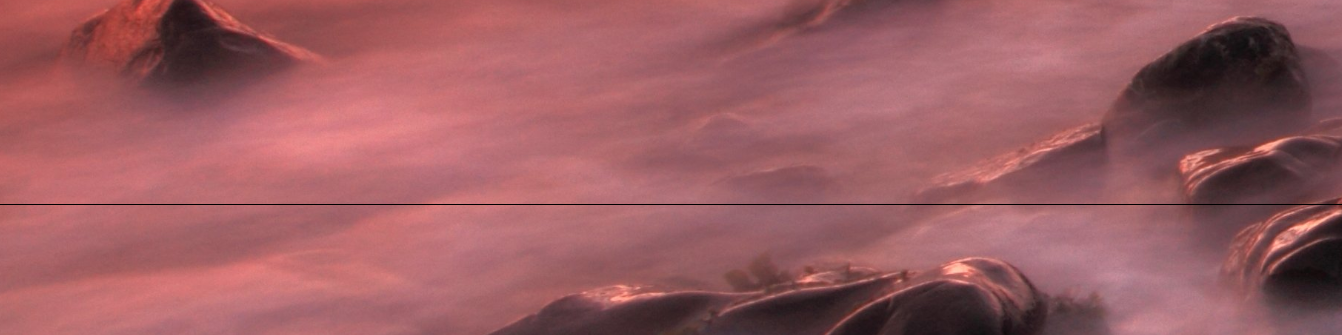
For the past several months (6+) Start11 intermittently leaves a thin horizontal line on my display (on both laptop and connected external monitor).

Clicking Restart Explorer on the Start11 Taskbar screen corrects the issue.


Current versions:

Windows 11 25H2

Start11 v.2.56

Laptop: ASUS ROG Zephyrus G16 

CPU: AMD Ryzen AI 9 H 370

Nvidia GeForce RTX 4070 Laptop GPU driver v.581.80

AMD Radeon 890M driver v.25.10.2

External monitor is an HDMI connected LG CI TV


3,759 views 41 replies
Reply #26 Top

Then, my question would be, how the taskbar go to hidden mode while you have chosen just to hide if you have Windows maximized or something Infront of your taskbar. This show, perhaps there is conflict somewhere. Hence my suggestion, to try the clean boot step to help iron out and identify any application that is causing the conflict.

Thank you,

Basj,

Stardock Community  Assistant

Reply #27 Top

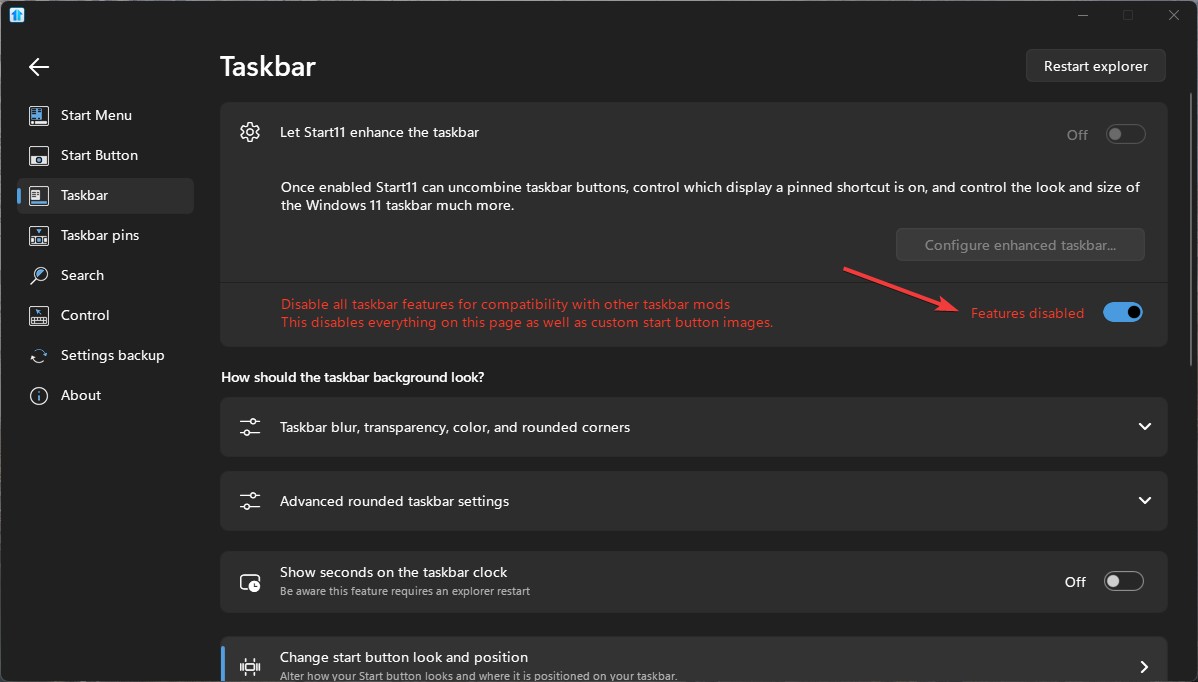
I turned that off because that was not the issue, how can  do a clean boot, it could take hours before the  line shows up again, i have many apps, am supposed to take weeks to go through every app and hope that is the problem?, lets be realistic, what   I am going to do is turn off start 11 handling taskbar, if issue does not pop up in about a day  i know it is start 11

Reply #28 Top

Thanks Haalee - very good summary of the observed problem and findings to date. My gut feeling - definitely a screen redraw/rendering issue and not a driver issue. Somehow the Start11 taskbar is leaving a black line on the monitor that corresponds (often, but not 100%) to the top of the taskbar itself.


Not a crippling issue, as an explorer refresh or activity on the monitor makes the line go away. More of an irritant.

Reply #29 Top

No black line since disabling start 11 taskbar but now windows still think i am using start 11 taskbar and it keeps disabling auto hide


Reply #30 Top
Quoting joeshades, reply 4146529

No black line since disabling start 11 taskbar but now windows still think i am using start 11 taskbar and it keeps disabling auto hide

End of joeshades's quote

Is your taskbar at the bottom of the screen?

Thats the only supported configuration for autohide in Windows 11 without the Start11 enhanced taskbar.

Reply #31 Top
Quoting Neil, reply 4146531
Quoting joeshades, reply 4146529

No black line since disabling start 11 taskbar but now windows still think i am using start 11 taskbar and it keeps disabling auto hide

End of joeshades's quote

Is your taskbar at the bottom of the screen?

Thats the only supported configuration for autohide in Windows 11 without the Start11 enhanced taskbar.

End of Neil's quote

Yes


Reply #32 Top

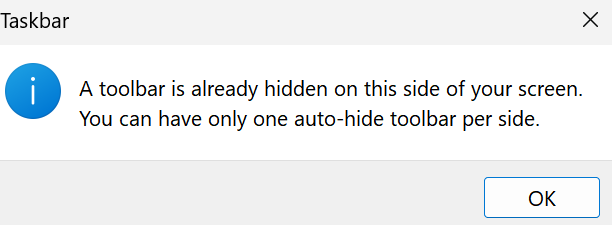
I have completely disabled the Start 11 taskbar yet  windows keeps telling me i can't autohide because another program is autohiding the taskbar

Reply #33 Top
Quoting joeshades, reply 4146870

I have completely disabled the Start 11 taskbar yet  windows keeps telling me i can't autohide because another program is autohiding the taskbar

End of joeshades's quote

Have you tried turn this setting off?

Thank you,

Basj,
Stardock Community Assistant

Reply #34 Top
Quoting basj, reply 4146871
Quoting joeshades, reply 4146870

I have completely disabled the Start 11 taskbar yet  windows keeps telling me i can't autohide because another program is autohiding the taskbar

End of joeshades's quote

Have you tried turn this setting off?

Thank you,


Basj,

Stardock Community Assistant

End of basj's quote

Yes that is what I did

Reply #35 Top

Just to be sure, turn that back on and turn on enhance taskbar, and go into Start11 enhance taskbar setting and make sure the Autohide is disabled while in there. once that is off, check on Windows taskbar setting->Taskbar behaviors-> try turning on "Automatically hide the taskbar". Does that work?

Thank you,

Basj,
Stardock Community Assistant

Reply #36 Top
Quoting basj, reply 4146873

Just to be sure, turn that back on and turn on enhance taskbar, and go into Start11 enhance taskbar setting and make sure the Autohide is disabled while in there. once that is off, check on Windows taskbar setting->Taskbar behaviors-> try turning on "Automatically hide the taskbar". Does that work?

Thank you,


Basj,

Stardock Community Assistant

End of basj's quote

I will let you know, sometimes i have it set and it is fine for hours then the message, although it was already off

Reply #37 Top

Please post a screenshot of the message that popup so we can review it.

Thank you,

Basj,
Stardock Community Assistant

Reply #38 Top
Quoting basj, reply 4146875

Please post a screenshot of the message that popup so we can review it.

Thank you,


Basj,

Stardock Community Assistant

End of basj's quote


Reply #39 Top

Hello,
Sorry to hear you are having issues. That screenshot talking about hidden "toolbar" not really sure if that the same as Hidden taskbar. And from what I know, toolbar is something from Windows 10 and no longer available in native Windows 11. Perhaps, you're using other 3rd party application to bring it back?


Thank you.
Basj,
Stardock Community Assistant.

Reply #40 Top
Quoting basj, reply 4146881

Hello,

Sorry to hear you are having issues. That screenshot talking about hidden "toolbar" not really sure if that the same as Hidden taskbar. And from what I know, toolbar is something from Windows 10 and no longer available in native Windows 11. Perhaps, you're using other 3rd party application to bring it back?


Thank you.

Basj,

Stardock Community Assistant.

End of basj's quote


No all I have is start 11, which i just removed to see if that stops it


Reply #41 Top

Hello,
I have forwarded your problem/question to Stardock Support Team for their assistance. Please keep an eye on this thread for any updates. We appreciate your feedback and patience. Thank you.

Basj,
Stardock Community Assistant