I was just shutting down my computer, so I started closing apps. After closing several of them, I experienced the issue of the wrong app being displayed above the icon when I hover with the mouse over the icon. I took a screenshot, but the mouse cursor was not captured, so you'll have to take my word for it where the mouse was. Here is the screenshot:
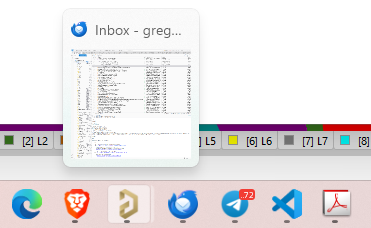
The mouse is over the icon for Altium Designer, but and you can see there are multiple instances of Altium Designer running because the icon shows a shadow. The icon to the right is Thunderbird, which is being shown above the Altium Designer icon. When hovering over the Brave browser icon, it shows the 4 windows I had open. All of the icons to the right of the Altium Designer icon were shifted, but to the left they were OK. In other words, hovering over the Thunderbird icon showed Telegram, and hovering over Telegram showed Microsoft Code, etc. But interestingly, as I type this, the problem has resolved itself. I'll have to continue monitoring this to look for more clues. Maybe Altium was taking a long time in shutting down? And Windows was reporting the wrong information to Start11? And eventually after Altium was completely gone, then the display caught up?
This isn't a big deal, since apps aren't being corrupted or anything like that. I can Alt-tab to get to instances that aren't being displayed on the taskbar. Hopefully more clues will present themselves.
Regards,
Greg



 Stardock Forums