

Persistent Windows 11 conflict - I want a refund!

I installed Fences several weeks ago and after the intial pleasure of an excellent desktop (so good I paid for it), I've now encountered a persistent conflict with Windows 11. Fences informed me of an update, so I installed it, and my Windows desktop then started freezing on bootup. I could not do anything but a hard reboot into safe mode, uninstall Fences, run the purge tool, follow several other suggestions from online forums, and eventually achieve a stable desktop with Fences apparently uninstalled. It took hours of my time. Now, whenever Windows installs an auto update I get the frozeon desktop problem. Somehow Fences is maintaining a hold on my Windows registry - it keeps reappearing whenever Windows updates. I've paused windows updates (with attendant security risks) and this gives me a few days without problems, but as we know, Windows will eventually override paused updates for security fixes. And then the whole cycle of desktop freezing followed by windows uninstall starts again. In total I've lost days of my life to this, and your software seems to be at the heart of it. My next step is to do a new install of windows 11 which will incur numerous hours of work reinstalling apps. You should be compensating me for my time. I demand a refund. 
196 views 5 replies
Reply #1 Top

I am sorry to hear you are having problems.

If you ran the purge tool then Fences should not be installed as that deletes all the files.  If you go to C:\program files (x86)\Stardock there should be no Fences subfolder left.  Is this the case?

It is not possible for an app to have a hold on the registry.

It may be whats happening is the Windows update is failing for unrelated reasons and Windows is reverting to a saved restore point which existed when Fences was installed.

Reply #2 Top

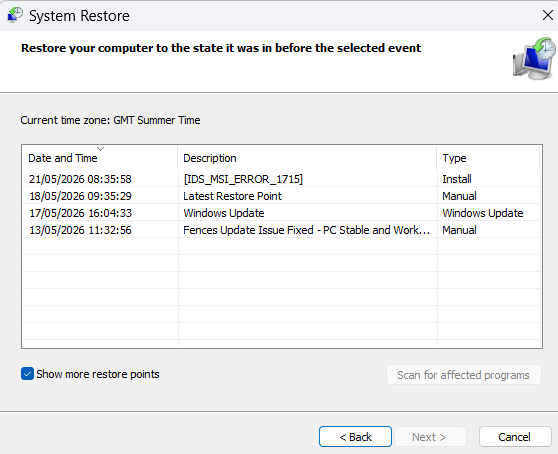
Thanks for your reply. This morning my Windows 11 desktop froze again. Despite disabling windows update last week, somehow something is causing my desktop to freeze. I've run the windows uninstall latest updates and the desktop now works, but Fences now reappears in the applist. However, I have several restore points in recent weeks manually created following the apparent removal of Fences (see screen clip). Notably, the last restore point on 21/5/2026 shows an MSI error. 

To recap where I am now: I uninstalled the latest windows security update, my desktop functions, but it seems there are Stardock and Fences  remnants present on my PC. File explorer shows a Stardock folder in Progam Files (x86), with one subfolder /Notifications containing an Assets directory and several .dll and some executable files. However, I cannot see a Fences directory or exe file. In Settings/Apps/Installed Apps I CAN see Fences 6.4.6.1 from 2nd May 2026. Please advise. 

Reply #3 Top

Just to add in here. Fences does not use MSI. Another application generated this.


Likewise, echoing that uninstalling, rebooting, and verifying files are not in C:\program files (x86)\Stardock\Fences will ensure it is not part of the issue. The app does not have program files in any location other than this location, and it does not embed in the system. Should these files be removed, the app is gone.

Reply #4 Top

Perhaps you can help me to understand why, despite following all the recommended steps to uninstall Fences, I still have a Stardock directory, with a Notifications sub-directory containing a bunch of .dlls and other files. How do i remove this permanently. Also, the fact remains I paid for Fences, it caused a problem, and now I've had to uninstall it. Stardock should refund me.  

Reply #5 Top

It best to use purge to remove everything. Use this guide to purge: https://support.stardock.com/space/SHC/1332477959/Fences+purging+and+re-installing

If you not interested into solving the issue and asking for refund, Please raise support ticket using the link below, use the "Refunds" option. Include all information details. Remember to record down the ticket number for future reference if needed. Do not raise multiple ticket, that will make your ticket back to the end of the line. Send once and wait. Ticket will be answer by the order they send in.

https://stardock.atlassian.net/servicedesk/customer/portal/4/group/13 

Thanks
Basj,
Stardock Community Assistant
