Start11 V2.1: Is there a way to hide selected start menu app and folder?

I'm curious if any individual app or folder in the all progra, list could be set to hidden. 

For instance could 'Amazon Photos' be hidden by Start11 V2? Making it possible to reset the app to 'show' at some later time. 

The alternative would seem to be using delete which has some negative aspects. 

19 views 3 replies
Reply #1 Top

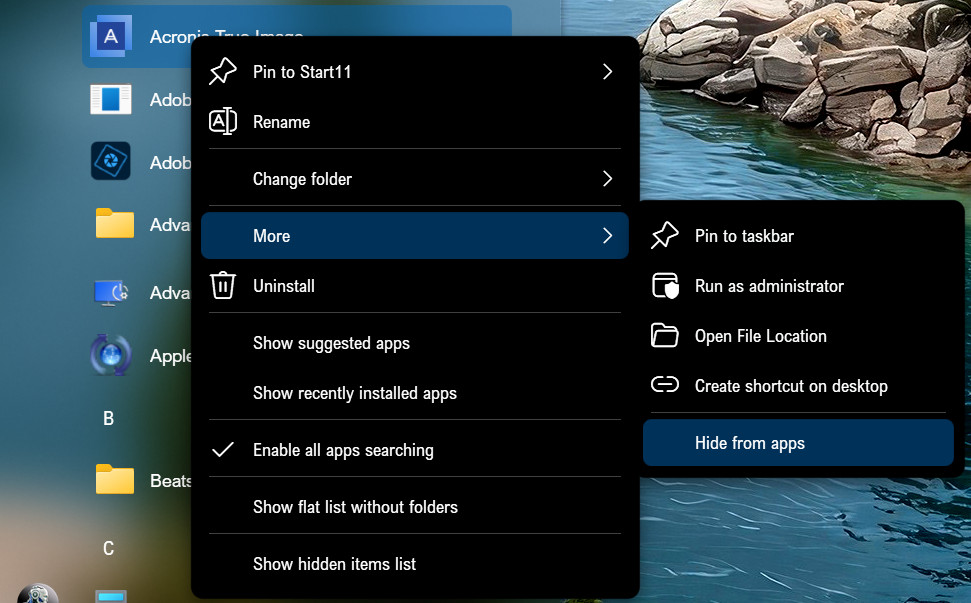
Not sure what menu style you are using, but you should be able to hide apps by right-click context menu in the All Apps section.

To show the app again, right-click any item in the All Apps section and choose "Show hidden items list," and then right-click the app you want to unhide and select More >  uncheck "Hide from apps."

You won't be able to hide folders this way.

Reply #2 Top

Thanks. I'm using Modern Style (updated Windows 7 style).  After trying out some Configure Menu options, I learned that two Modern Style options will significantly impact what shows up when right-click is used. The two Modern Style options are:

"Use Windows 10 style all programs list rather than Windows 7 style"
and
"Open all apps list as a menu"

If both of these options are set to Off then right-click delivers a long list of choices (without any Start11 items)

but if either (or both) is set to On then right-click provides Start11 items. 

I have been using the former (both options Off) since I wasn't crazy about the index separators (#,A,B...) within the list. But turning on "Use Windows 10 style all programs list rather than Windows 7 style" will let me hide an app.

Also as an aside, if either option is On then "Place folders at the bottom of the list" is ignored.

Reply #3 Top

You might have to switch on "Use Windows 10 style all programs list rather than Windows 7 style" to hide the icons, but then you should be able to switch back to the Modern Style.