shift+right click not showing correct menu with always combine icons

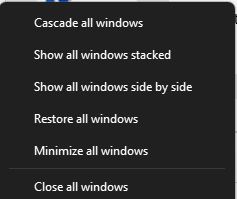
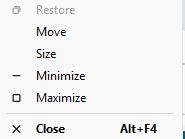
I always combine my icons in the taskbar.  When I shift right + click on a combined icon in the taskbar which has multiple occurrences of the app in it, I get the following popup.
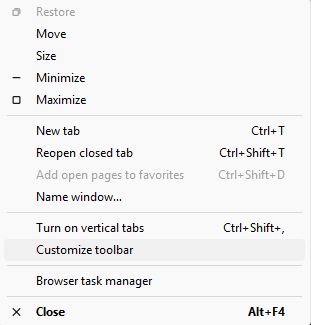
If I turn on the option in Start 11 to enhance the taskbar and tell it to always combine icons in the task bar and then right+click on a combined icon in the task bar, I get the following popup.
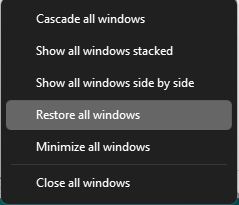
In Start11, how can I get the popup from the first image?

Thanks,

Bill



1,359 views 5 replies
Reply #1 Top

Hello,
I have forwarded your request to the Stardock Support Team for their review and recommendations. Please keep an eye on this thread for any updates. We really do appreciate your feedback, Thanks

Basj,
Stardock Community Assistant.

Reply #3 Top

Helloo again,

Unfortunately, there is nothing to report on this one.

Thank you,

Basj,

Stardock Community  Assistant

Reply #4 Top

Hi Bill, thank you for posting.

Quoting BillH99999,

In Start11, how can I get the popup from the first image?

End of BillH99999's quote

The simple answer to this question, seems to be by hovering over the combined icons for the thumbnail preview.  From there, you can right-click an individual thumbnail preview for the per-window options of your first image.  

Please let us know if this helps and if you have any other questions.

Best regards,

Adam McGuinness
Stardock Support Specialist

Reply #5 Top
Quoting Abisnabidam, reply 3993668

Hi Bill, thank you for posting.


Quoting BillH99999,

In Start11, how can I get the popup from the first image?

End of BillH99999's quote

The simple answer to this question, seems to be by hovering over the combined icons for the thumbnail preview.  From there, you can right-click an individual thumbnail preview for the per-window options of your first image.  

Please let us know if this helps and if you have any other questions.

Best regards,

Adam McGuinness

Stardock Support Specialist

End of Abisnabidam's quote

I didn't say it very well, but I really was just trying to say that I always turn on the option to combine icons in the taskbar.  I still have a problem in that this method doesn't work on icons that are not combined.  I need to be able to access this menu on non-combined icons also.  It works fine in Windows 11  if I turn off "let start11 enhance the taskbar", but not if I turn that on.  How can I get this menu back on non-combined icons?  Start11 should not take away a function of Windows 11 like this.