January 2017 Desktop Screen Shots

Happy New Year!


Happy new year, denizens of WC!

I hope it will be a better year than the one behind us...more productive, healthier and happier for one and all.

For me, Naked Noir WB (vStyler) and Winstep Xtreme (Webgizmos)...


49,077 views 36 replies
Reply #1 Top

Happy New Year, Seth.

Thanks for posting. Nice screenshot.

Reply #2 Top

Happy new year... kool desktop Seth.  Is that the deathstar?

Reply #3 Top

Quoting teddybearcholla, reply 2

 Is that the deathstar?
End of teddybearcholla's quote
...Barb ^_^ lol

Reply #4 Top

Here's one I should be releasing later this month called Sabre, still a work-in-progress...  :)

Sabre for Windowblinds

+1 Loading…
Reply #5 Top

Quoting teddybearcholla, reply 2

 Is that the deathstar?
End of teddybearcholla's quote

Yep....aka "The Mods' Shack". ;)

Reply #6 Top

Quoting LightStar, reply 4

Here's one I should be releasing later this month called Sabre, still a work-in-progress...  :)

End of LightStar's quote
 
Looking good, LightStar.
Reply #7 Top

Quoting neone6, reply 3

.Barb lol
End of neone6's quote
   What!! Ok...a broken deathstar!! lol!  .... and broken mod shack
Quoting DrJBHL, reply 5

Yep....aka "The Mods' Shack
End of DrJBHL's quote
       .... lol!!

Reply #8 Top

Nice job, Tom. Looks good here!!!

Reply #9 Top

Nice one, Tom!

Reply #10 Top

Sabre is looking good.  :star:

Reply #11 Top

Sweet one Tom.  :thumbsup:

Reply #12 Top

Working again  ^_^

Reply #13 Top

You never cease to amaze! ^^^^

Reply #14 Top

Quoting Uvah, reply 13

You never cease to amaze! ^^^^
End of Uvah's quote
Thanks Uvah, Will be a Completely New concept  *_*

Reply #15 Top

Quoting DrJBHL, reply 5

Yep....aka "The Mods' Shack".
End of DrJBHL's quote
Ha! Always suspected U guyz were on the Dark side  ^_^

Reply #16 Top

Old School for me! Multipass Carbon


Reply #17 Top

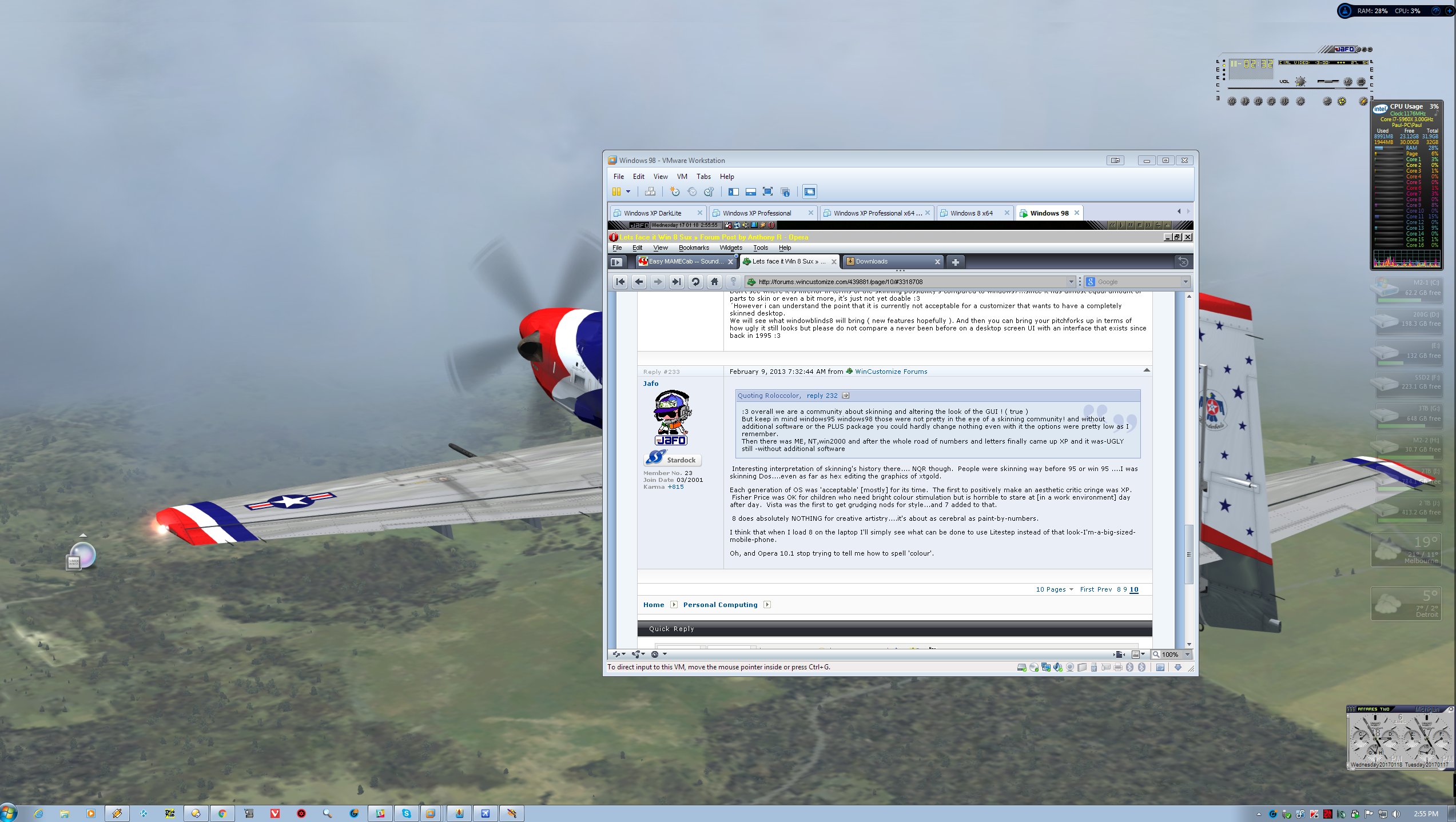
Let's see if I can describe this....

It's my 'beast' dumbing down to a VM of Win98....running Litestep....with an open Opera browser window loading an old cached Wincustomize.com forum comment about how bad Win 8 was going to be...was....is...;)

Ah, nostalgia...it ain't what it used to be...;)

Reply #18 Top

What's even worse....was mucking around in there and got the link to skinz.org [coded into my litestep theme] and lo and behold....some of my stuff's still there.....centuries later...;)

Reply #19 Top

Anyone looking forward to warm weather? Maybe a nice vacation? Well, Tidal may cheer you up a bit. Releasing in a week or two!


Tidal for Windowblinds


Comments appreciated!  :)

Reply #20 Top

Nice look, Tommy!!!  Lovin it!!


Reply #21 Top

@LightStar

This is amazing. Soft on the eyes and a peaceful calming feeling. Very nice wallpaper too. :thumbsup:

My only nitpick would be this:

I would like clock font color and titlebar text color to match color of inactive taskbar button font color like Corel Paint Shop button and WMP button. Clock font color looks a little bit darker and so does titlebar text color. The reason I want them to match is because I tend to place taskbar on top.

Oh, one more thing. I see windows have transparent borders. Maybe you could make them even more transparent(?) because at first glance it's hard to notice there is any transparency at all. Maybe it's good as it is, but there is a certain satisfaction in seeing what's behind the window border.

Other than that I have a more general request: Include a substyle with standard Windows font settings. This skin seems to have unaltered fonts so no problem here. I am probably contradicting myself asking for standard Windows font settings and asking for matching font colors earlier, but I just wrote those things that came to my mind.

I'm excited about this one. Will buy this. :sun:

Reply #22 Top
Quoting anotherside, reply 21

@LightStar

This is amazing. Soft on the eyes and a peaceful calming feeling. Very nice wallpaper too. :thumbsup:

My only nitpick would be this:

I would like clock font color and titlebar text color to match color of inactive taskbar button font color like Corel Paint Shop button and WMP button. Clock font color looks a little bit darker and so does titlebar text color. The reason I want them to match is because I tend to place taskbar on top.

Oh, one more thing. I see windows have transparent borders. Maybe you could make them even more transparent(?) because at first glance it's hard to notice there is any transparency at all. Maybe it's good as it is, but there is a certain satisfaction in seeing what's behind the window border.

Other than that I have a more general request: Include a substyle with standard Windows font settings. This skin seems to have unaltered fonts so no problem here. I am probably contradicting myself asking for standard Windows font settings and asking for matching font colors earlier, but I just wrote those things that came to my mind.

I'm excited about this one. Will buy this. :sun:

End of anotherside's quote


Thanks for commenting anotherside. I looked into the font color thing and took care of that for you, I agree, it looks better. But as far as the other two recommendations, sorry on those, but the skin will stay as is.  :)

Reply #23 Top

OK, thanks. You made the right decision regarding window borders. They match the rest of the skin the way they are.

Regarding font selection, I really like the Segoe UI font, but it can be changed in WB and/or Skin Studio so no big deal.

Reply #24 Top

Tidal looks good!  :thumbsup:

Reply #25 Top