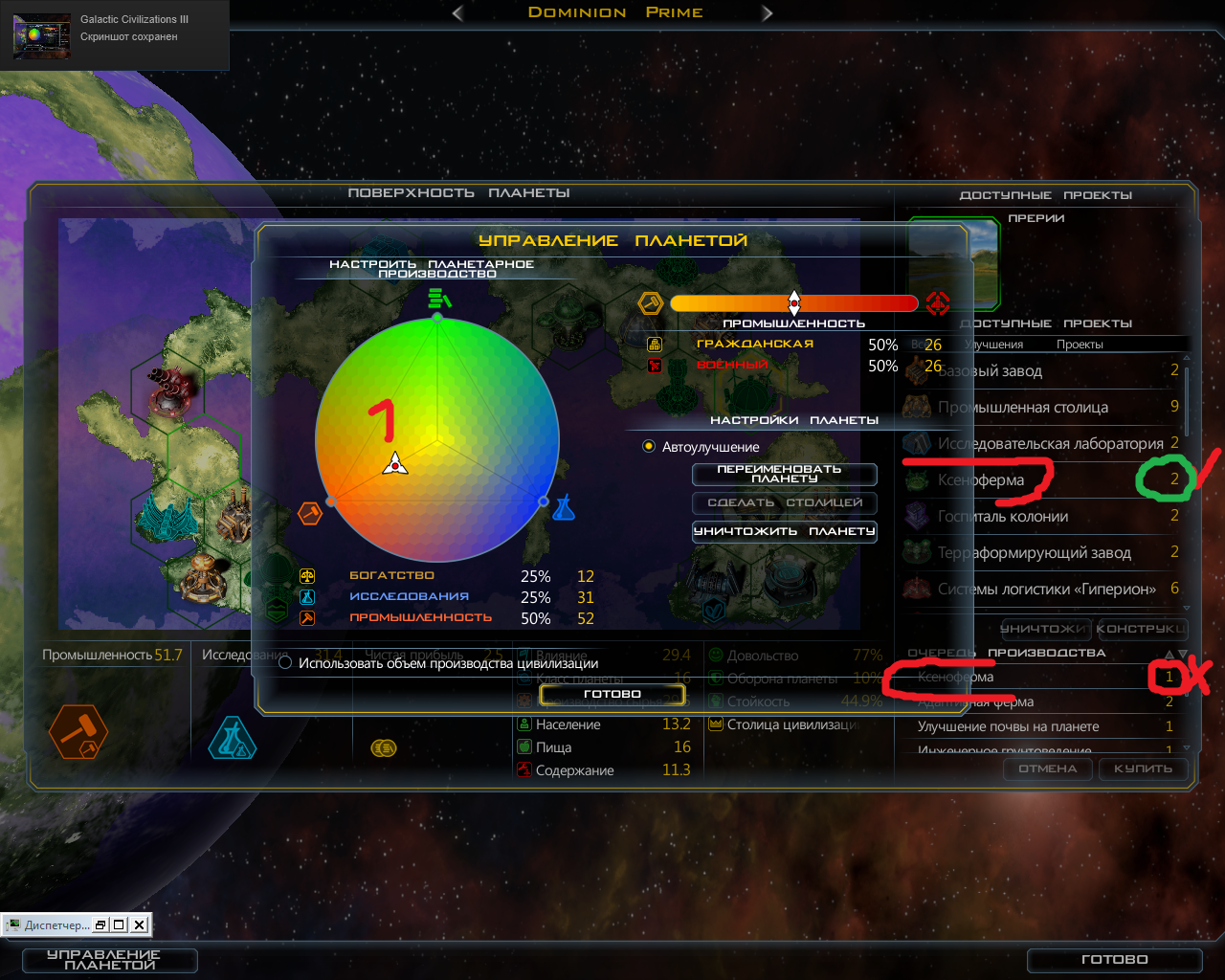
1.2 asleep loading campaign no updated list of all production

'


1) Clicks a colored circle, do not queue production updates digit days. Urgent fix!

and further

2) Update version 1.2. I play a campaign, traffic loading screen black hole - waited a long time that I remember nebyvaet version 1.1. was faster loading campaign.
Solution: 3 times press ENTER, and space. and 3-4sek. I finished loading the campaign.

p.s. Reinstall the game, did not help!


11,182 views 7 replies
Reply #1 Top

1) This is a display issue -- if you close/reopen the planet screen, the production queue time will show the correct value.  I'll look into getting it addressed.

2.) I haven't been able to reproduce this.  I started the campaign several times and didn't see any difference based on whether or not I was pressing any keys.  Is there any additional information you can provide?  

Reply #2 Top

1) Yes, to say "closes the planet" and "a screen of the planet" works update the progress of all proceedings.

2) Version 1.1. All right, do not touch the keyboard - run faster to load.

The latest version 1.2. loading campaign nothing happened, but ENTER and SPACE still reacted game.
It seems like asleep.

---
I remembered

3) The ship colonization of a new planet, problems of any chosen buildings, displaying 0 days to build the word "acceleration" appears as 100%. Click stroke, went 9 days mapping the planet build looks like 0%.


Later, I will lay out the video ...


Reply #3 Top

same phenomenon here...

game loads ok, can start new games, can load old savegame of the "milkyway" map (which is little bit more than 4 times the size of the standard campaign savegame file)...

but trying to load an old save of the standard campaign (just 1-2 days before installing latest patch 1.2) scenario "contingency" the game is stuck at the "loading" screen (animated galaxy swirl) seemingly forever (several minutes) where the "milkyway" save loads in half a minute at worst -- oh, and the described workaround did it for me, too (pressing enter & space a few times).

interestingly if I immediately save that game again, without doing anything, the new savegame is smaller (4194k instead of 4228k) -- but it still has the same problem... loading never finishes without using the keyboard (space/enter, didn't try other keys ...).

sorry but I will be offline several weeks and thus unable to help with debugging, starting day after tomorrow...

so if you want me to upload those savegames for example, or anything else... tell me now :-)

Reply #4 Top

Time video list bug.
1) 2:56
2) 6:27
3) 7:30   Why "Rushed" just finished building, click speed, and again "5 course" all proizvostvo?

http://vk.com/video-100075494_171391892

Reply #5 Top

We have a fix for the campaign loading issue going in for 1.3.  In the meantime if you disable mods, you'll be able to load the campaigns without the delay.

Reply #6 Top

Quoting pshaw, reply 5

We have a fix for the campaign loading issue going in for 1.3. In the meantime if you disable mods, you'll be able to load the campaigns without the delay.
End of pshaw's quote

No mod! Today I tried the beta 1.3, it is also useless.
I'll try My Games \ GalCiv3 deleted file debug.err 356 KB, Prefs.ini 10 kb, HotKeys.ini 5 KB. Folder Designs, Exports, Factions, MPSaves. Mods folder 2 KB, 1 file.

-

Mission accomplished 2№.

Another problem was, update the list of "Manufacturing Queue"?

When the correct "Manufacturing Queue"?

Reply #7 Top

The fix for getting the production to visually update is unfortunately not in 1.3