

My Early Access Journal - Updated 4/15 for 0.0.2.0


Bug Reports

I'm going to be updating this list as I play. If I see something that has been patched out I'll will try and strike it out.  


General

[Suggestion] Use a different font. It is unreadable at times. Such as the text inside the HP bar of one of my Altarian ships

[Suggestion] Larger icons would help. Icons are very small.


Options Screen

The game is chugging after changing some of the options that don't require restarting the game.  I will try to narrow this down later.

[Suggestion] Toggling to Fullscreen Mode should not require restarting the game. Unless, there is something else going on.

[Bug] Fullscreen mode is not what I expected. Instead of switching to true full screen it appears I'm in borderless windowed fullscreen which may confuse some people. 

[Bug] UI Size does nothing

[Bug] Mono speaker configuration only outputs sound on my Left speaker instead of playing the same sound out of both speakers.


Planetary Screen

[Bug] I have 10.2 production, however, takes 3 turns to create a 20 production cost Basic Factory. 

[Missing Features] Construction cost of ships missing

[Bug] Ocean Prairie?

*Screenshot here, water tile but says it's a prairie*

[BUG] I went into the Govern Planet screen and changed my planetary production from full production to full research. I clicked done and the Manufacturing Queue still shows the same turns till completion that it did before. When I exit the planetary screen and re-enter the manufacturing queue updated. Turns till completion times do not update until you exit the Planet screen and re-enter. 

Captain, are you sure this a good place to settle. It looks empty.

*insert screenshot, missing planet texture*


Govern Screen :: Economic Tab

[Typo] Weekly Income > Saving should be Savings

[Suggestion] The economy tab should display values with at least one decimal place, or a tooltip.


Map Screen

[Annoyance] Grid lines are very hard to see depending on background. 

*Will insert screenshot link*

[Suggestion] Everything that is idle tab. Ships, colonies, etc..

5,569 views 19 replies
Reply #1 Top

So far, so good.

GalCiv is very playable for an alpha. It's fun going through all the coming soon features. I love the economic tab. I think this feature may start appearing more in other games. It's very well done and makes tuning your economy very easy. The ship movements are very fluid.  I was also happy to see some of the user convenience features such as after clicking new turn if any units are now idle with movement points you have an option of moving them before the next turn completely processes. 


I think the only real gripe I have, and it is beta, is that I'm unable to launch a stationed ship from the ship list. Hopefully, later a right context menu can be added. 

Reply #2 Top

Just an FYI

The Large UI only triggers if you have a screen size larger than 1600x1200. You can check this in the UISizeDefs.xml

If you try to use the Large UI thing on smaller resolutions, it looks really screwy though


Also you can turn off 'borderless windowed' mode by enabling "Clip Cursor". Yes this is really counter intuitive...

Reply #3 Top

I'm playing on 1920 x 1024. Should be no problem there unless my screen height is the problem. 

Reply #4 Top

Quoting Illauna, reply 3

I'm playing on 1920 x 1024. Should be no problem there unless my screen height is the problem. 
End of Illauna's quote

You'd have to check the xml file. On mine, the 2x doesn't even trigger until you hit 1600x1200. So maybe your height is the problem. You can manually edit the file I mentioned above to force the game to use the large UI at any aribtrary resolution or above. But again I warn you this can look REALLY weird :P. There's also a 'medium' UI hiding in there (ooooh secrets!!) but it's commented out (boooo). Don't try adding the Medium UI as that causes the game to crash on load. Just edit the Large UI xml entry to 2x or 1.5. Experimetn!
 

Also as another bug the 'clip cursor' thing seems to have a mind of its own. It 'sometimes' does it but then resets it self other times??? Its fussier than Clippy.

Reply #5 Top

Great feedback. Let me see what i can help with.

The font code is getting a refresh, that should address most font issues.

We have a UI sizing system, but it was not quite ready for the alpha. You will have several sizes to chose from, and they will address many of your issues, such as the Icon Size.

In fact the UI Size option dose do something, sadly it only support Large at the moment and if your screen size is not big enough it appears to be doing nothing, this is a bug we will fix. If you have a very High Res screen you can run Large UI, I have run it on a 4K several times and it looks great.

The planet Terrain system is getting a complete overhaul, so most of the terrain, feature and placement bugs will all be going away, (And replaced with different ones) soon.

Reply #6 Top

[0.0.2.0]

Test Date: 4-15-2014

Galaxy Size: Tiny

Duration: 2 hours


New Game

Race: Terran

Galaxy Size: Tiny 

I'm starting to realize that there might not be enough races to choose from. I've been playing 8 player maps in Civilization and I've grown accustomed to the large number of choices.  I don't expect 30 races from the outset of the game, but 8 would be a nice happy number.  Endless Space bothered me when I would see more than one copy of a faction which would be required if maps could have more than 4 races on the field.  Different factions within a race is ok with me, such as having different leader for each ideology.  You could have a Mericless leader like Jena, a Pragmatic leader like Alan Bradley and a Benevolent leader like the dude from the trailer.
 
We need to be able to reorder the Manufacturing Queue. I might have already mentioned this.
 
Rename Starport to Stardock for a shameless plug to the developers.  Hey if my star, if it's approved, is going to be named Illauna I will allow this. :D

Controls
Right clicking during ship movement should be able to interrupt the move command.  This will allow the player to respond to a threat that appears after uncovering the total and partial fog of war. 

Keyboard controls for ship movement like WASDQE or numpad. Eh, low priority.
 
Pathfinding
A ship can path out of their factions supply radius. 
 
UI
On a given turn, I should be able to see the maximum range my ships can move.  Or, at least be able to toggle such an option.  
 
Right clicking a building or unit, even player created units, will open the Brad-o-pedia with details of the unit. 
 
Hover tool-tips should have the construction cost of each item in the build menu. If that is what is currently happening the numbers are WAY off.
 
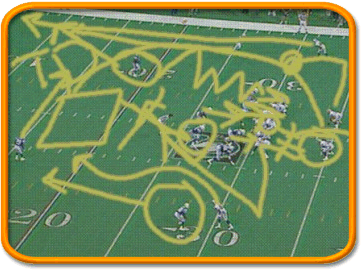
Grant the ability to draw Madden style battle plans and signs. Civ4 had this. I don't know why it didn't stick. I would like to make signs that I can toggle with an overlay that I can set to display random notes and plans. With this I don't have to name my cities according to function. 
 
Double clicking on an ideological choice should unlock it if you have points available. 
 
Gameplay
The event pop-ups need to be a bit more interesting.  Instead of choosing just the number of ideology points and what degree of the chosen bonus (0 research, .25 research, .50 research) the bonus may sometimes have different benefits. For instance, the sentient pod-like creature event gives the benevolent choice 10 ideology points which I think is fine given the context, however the merciless choice gives +50% research. It should also grant -10% moral because the population is being forced into the decision.  However, it could also have another bonus such as +10 soldiering bonus because as a matter of sanity the people will need to learn how to suppress the pain. 
 
 
BUG
Mini Map
1.  Planets and Anomalies overlays take multiple mouse clicks to change states. 
     a.  Enable the overlay
     b.  Click once to disable the overlay.
     OBSERVE: To reenable the overlay you will need to click twice.  The first click plays a tick sound but does nothing.  The second click enables the overlay. 
     RELATED: The grid works this way as well.
Reply #7 Top

Quoting Illauna, reply 6
I don't expect 30 races from the outset of the game, but 8 would be a nice happy number.
End of Illauna's quote

Wish Granted, there will be 8 at release (and hopefully during beta)

Quoting Illauna, reply 6
We need to be able to reorder the Manufacturing Queue. I might have already mentioned this.
End of Illauna's quote

Allready in the game just click and drag.


Quoting Illauna, reply 6
Right clicking during ship movement should be able to interrupt the move command.  This will allow the player to respond to a threat that appears after uncovering the total and partial fog of war.
End of Illauna's quote

Totally agree, this one has gotten me multiple times a game.

Quoting Illauna, reply 6
A ship can path out of their factions supply radius. 
End of Illauna's quote

Pretty sure this is working as intended. A ship can go out of range as long as its endpoint is in range. This is exploitable in certain situations, but not enough to be a real problem.

Quoting Illauna, reply 6
Grant the ability to draw Madden style battle plans and signs. Civ4 had this. I don't know why it didn't stick. I would like to make signs that I can toggle with an overlay that I can set to display random notes and plans. With this I don't have to name my cities according to function. 
End of Illauna's quote

"Madden-style" threw me at first, but once I got what you were talking about I really like it. Custom notes and tooltips would be great, especially for how long a game in a large galaxy can last.

Quoting Illauna, reply 6
The event pop-ups need to be a bit more interesting.  Instead of choosing just the number of ideology points and what degree of the chosen bonus (0 research, .25 research, .50 research) the bonus may sometimes have different benefits.
End of Illauna's quote

Just an alpha place-holder to make sure you can get the points to trigger ideology.

Reply #8 Top

Quoting Illauna, reply 6
Grant the ability to draw Madden style battle plans and signs. Civ4 had this. I don't know why it didn't stick. I would like to make signs that I can toggle with an overlay that I can set to display random notes and plans. With this I don't have to name my cities according to function. 
End of Illauna's quote

No idea about the Madden reference but absolutely agree about this idea/option, i am getting tired of having to name my planets with same names each game so I know what they do, especially now there will be some new cool star names (& I'll only have to change the "few" silly ones).

Reply #9 Top

Quoting LordChess, reply 8
No idea about the Madden reference but absolutely agree about this idea/option, i am getting tired of having to name my planets with same names each game so I know what they do, especially now there will be some new cool star names (& I'll only have to change the "few" silly ones).
End of LordChess's quote

Madden is a commentator for American Football that tends to draw pictures on the screen to explain strategy and tactics to the audience. Here is a comical version of what you might see. 

I think it can be cheap because it doesn't need to be that high tech.  Just allow the user draw on an invisibile layer that projects on the play field. I donno it's an idea. 

Reply #10 Top

Quoting perigrine23, reply 7
Just an alpha place-holder to make sure you can get the points to trigger ideology.
End of perigrine23's quote

This is based on how I felt about a similar system in GalCiv2.  In GalCiv2, the malice response gave the biggest bonus, the good response gave no bonus, and the neutral response gave a mixed bonus.  So, I'm asking for improvements on this. 

Reply #11 Top

Quoting perigrine23, reply 7
Quoting Illauna, reply 6
I don't expect 30 races from the outset of the game, but 8 would be a nice happy number.
Wish Granted, there will be 8 at release (and hopefully during beta)

Quoting Illauna, reply 6
We need to be able to reorder the Manufacturing Queue. I might have already mentioned this.
Allready in the game just click and drag.
End of perigrine23's quote

I must have missed it in the notes. The second reply I'm curious where you can do this. I tried for a while on the governer screen. I ended up having to remove the item and readding it. 


Sorry for the multiple replies.

Reply #12 Top

Quoting perigrine23, reply 7
Pretty sure this is working as intended. A ship can go out of range as long as its endpoint is in range. This is exploitable in certain situations, but not enough to be a real problem
End of perigrine23's quote

What is the point of having the supply line, if you can go outside of it. I found when I set my ships to explore randomly, I got a ship 4-6 hexes away from their supply line. That is a huge difference. I don't mind they leave the supply range, but they should end in the supply range when finished with the turn, otherwise it should be a failed path. I would say this is NOT working as intended, but a very low priority issue.

Reply #13 Top

Quoting Illauna, reply 11


Quoting perigrine23, reply 7Quoting Illauna, reply 6
I don't expect 30 races from the outset of the game, but 8 would be a nice happy number.
Wish Granted, there will be 8 at release (and hopefully during beta)

Quoting Illauna, reply 6
We need to be able to reorder the Manufacturing Queue. I might have already mentioned this.
Allready in the game just click and drag.

I must have missed it in the notes. The second reply I'm curious where you can do this. I tried for a while on the governer screen. I ended up having to remove the item and readding it. 


Sorry for the multiple replies.
End of Illauna's quote


You should be able to click on the building in the queue list and drag it up or down.

Reply #14 Top

Quoting TGWarlock, reply 13


Quoting Illauna, reply 11

Quoting perigrine23, reply 7Quoting Illauna, reply 6
I don't expect 30 races from the outset of the game, but 8 would be a nice happy number.
Wish Granted, there will be 8 at release (and hopefully during beta)

Quoting Illauna, reply 6
We need to be able to reorder the Manufacturing Queue. I might have already mentioned this.
Allready in the game just click and drag.

I must have missed it in the notes. The second reply I'm curious where you can do this. I tried for a while on the governer screen. I ended up having to remove the item and readding it. 


Sorry for the multiple replies.


You should be able to click on the building in the queue list and drag it up or down.
End of TGWarlock's quote
 

I'm guessing it will probably get into the game. It's early. 

Reply #15 Top

Quoting Illauna, reply 14
I'm guessing it will probably get into the game. It's early. 
End of Illauna's quote

It's already in the game. I'm too used to having arrows to move items up or down the queue, so it took me a while to notice it, but drag-and-drop does work.

Reply #16 Top

Quoting Gaunathor, reply 15


Quoting Illauna, reply 14I'm guessing it will probably get into the game. It's early. 

It's already in the game. I'm too used to having arrows to move items up or down the queue, so it took me a while to notice it, but drag-and-drop does work.
End of Gaunathor's quote

Ok, well it worked. I don't know why it didn't work before. 

Reply #17 Top

I think the queue is still something that needs to be reworked - I don't have the control I'd like when reordering things (I'm pretty accustomed to the Windows start menu feature that puts a little black line to indicate where the item you're dragging will drop) and last I checked there's no way to scroll while dragging things - and when you drop an item into the queue to reposition it, the queue usually scrolls up to the top and I have experienced some difficulty locating the item I just moved.  I think a lot of this stuff is in development for the overhaul of the planetary government screen, though.

Reply #18 Top

Quoting iamderp, reply 17
and last I checked there's no way to scroll while dragging things
End of iamderp's quote

You can still scroll using the mouse-wheel.

Reply #19 Top

Quoting parrottmath, reply 12

What is the point of having the supply line, if you can go outside of it. I found when I set my ships to explore randomly, I got a ship 4-6 hexes away from their supply line. That is a huge difference. I don't mind they leave the supply range, but they should end in the supply range when finished with the turn, otherwise it should be a failed path. I would say this is NOT working as intended, but a very low priority issue.
End of parrottmath's quote

Ah, I never automate my ships for exploration, so I've never seen it. When manually controlling your ships you have to set a destination that is within their range.